Help:CheckUser/ja

From Meta, a Wikimedia project coordination wiki

Jump to: navigation, search
MediaWiki Handbook: Contents, Readers, Editors, Moderators, System admins +/-
これは技術的なマニュアルの参考訳です。方針については、CheckUserの方針を、最新のヘルプ情報については英文ヘルプをご覧ください。

CU権限を持つ利用者は、Special:CheckUserを使って、利用者のIPアドレスまたはCIDR(Classless Inter-Domain Routing)レンジという秘密情報(confidential data)にアクセスできます。 この情報に含まれるのは、「ある利用者が使ったIPアドレス群」と、「あるIPアドレスまたはレンジから編集したすべての利用者」と、「あるIPアドレスまたはレンジから行われたすべての編集」と「ユーザーエージェントの文字列」と、「X-Forwarded-Forのヘッダ」です。

Special:CheckUser allows a user with a checkuser flag to access confidential data stored about a user, IP address, or CIDR range. This data includes IP addresses used by a user, all users who edited from an IP address or range, all edits from an IP address or range, User agent strings, and X-Forwarded-For headers.

このツールは通常、ソックパペットを悪用する利用者に対処するために使います。(注:「チェックユーザー」という用語は、「秘密情報へのアクセス」(以下、適宜「CU」と略します)、もしくは「チェックユーザー権限保持者」(以下、CU係)、「チェックユーザーのフラグ、権限(the technical flag、以下、CU権限)」を指します)

This tool is usually used to counter users creating bad-faith sock puppet accounts. (Note: checkuser may refer to an access to confidential information, a user with permission to do so, or the technical flag.)

Contents

[edit] 検討/Considerations

[edit] ウィキメディアのプライバシー・ポリシー

ウィキメディア財団のチェックユーザーはprivacy policyチェックユーザーの方針に従います。利用者に関して蓄積された秘密情報の公開は、深刻な方針違反や混乱を防止するのに他に方法がない場合以外は禁じられています。

Checkusers under the Wikimedia Foundation are subject to the privacy policy and CheckUser policy. Revealing stored confidential data about a user is prohibited unless this is necessary to prevent significant violation of policy or disruption that cannot otherwise be dealt with.

CU係は、可能ならば情報を開示することなしに、また必要でも最低限の情報開示で、事態を解決するよう努めるべきです。以下の情報は、一般に許容範囲です。しかしこのリストはどんな場合にも適用できる(comprehensive)というわけではありませんし、CU係の判断の代わりにはなりません。CU係は(訳注:開示してよいと)確信がなければ、詳細情報は出さずにMagic 8-Ball のように答えるべきです。

If possible, the checkuser should attempt to resolve the situation without releasing any information, or by releasing the minimum possible information. The following information is commonly permissible. This list is not comprehensive, and cannot replace the checkuser's judgment. If the checkuser is at all doubtful, they should give no detail and answer like a Magic 8-Ball.
  • 個人情報に触れずに、ある利用者がソックパペットであると確認すること。
  • その利用者自身によって公開された情報。
  • 接続元のISP (ただし当該ISPが十分に大きくてその情報が個人特定につながらない場合)
  • 国 (これは通常個人特定につながりません)
  • confirmation that a user is a sockpuppet without noting personal information;
  • information released by the user;
  • the ISP edited from, if it is large enough that the information is not personally identifiable;
  • the country, which is generally not personally identifiable.

プライバシー・ポリシーの該当部分は以下の通り:

The relevant section of the privacy policy states:

ウィキメディア財団の方針では、サーバログから集められた、ないし、チェックユーザーの権限を経たデータベース内の記録を通して集められた、個人を特定できるデータは、データにアクセスした開発者ないしチェックユーザーによって、次の場合にのみ提供されます。

  1. 法的に有効な召喚状、または、法執行機関からその他の強制的な要求を受けた場合。
  2. その情報が帰着する利用者当人の許可を得た場合。
  3. 財団理事長、その弁護士、またはその指名する者に対する提供であって、不正使用の苦情の調査に必要な場合。
  4. スパイダーあるいはボットによって生成されたページビューに属する情報に関して、それを広めることが技術的問題の説明・解決に必要な場合。
  5. その利用者が項目を破壊しつづけているとき、または破壊的な行動をつづけているとき、IPブロックの対象の決定を助けるために、または関連インターネットサービスプロバイダへの苦情の作成を助けるために、データを提供する場合があります。
  6. ウィキメディア財団や利用者や公共の、権利、財産および安全を守るための合理的な必要性がある場合。

ウィキメディア財団のポリシーでは、上記の状況を除くいかなる状況においても、そのような情報を一般に配布することは容認されません。

[edit] メーリングリスト

ウィキメディアのCU係は非公開なメーリングリストであるcheckuser-lに参加します。CU係はここで議論したり、助けやアイディアや他のCU係の意見を求めたりできます。

Wikimedia checkusers have access to the private mailing list checkuser-l. They may use this list to discuss or get help, ideas and second opinions.

[edit]

  • CU係は魔法の力をもったウィキの妖精ではありません。IP調査の殆どは、二人の編集者が同じようにふるまっているためになされるでしょう。編集パターンの一致は重要です; IPの一致は、実は追加証拠となるか(ならないか)というところです。
  • CheckUser is not magic wiki pixie dust. Almost all queries about IPs will be because two editors were behaving the same way. An editing pattern match is the important thing; the IP match is really just extra evidence (or not).
  • ダイヤルアップの大半とADSL・CATVの多くは可変アドレスです。セッションごと・日ごと・週ごと・月ごとに異なるかもしれませんし、ほとんど変わらないこともあります。アクセスした時刻が近接していない場合は、一致を宣言する際に慎重になってください。しばらくすると、どのIPがどの程度の頻度で変わるのか分かるようになります。
  • Most dialup and a lot of DSL and cable IPs are dynamic. They might change every session, every day, every week, every few months or hardly ever. Unless the access times are right next to each other, be cautious in declaring a match. After a while, you get to know which ISPs change quickly or slowly.
  • プロクシの場合、そのプロクシ(per whois output)を運営している組織の大きさによっては、一致しているとは言えないかもしれません。
  • If it's a proxy, it might not be a match, depending on the size of the organisation running the proxy (per whois output). If it's an ISP proxy, it is not so likely to be a match.
  • AOLアドレスの場合は運がありません — AOLは ページリクエストごとに異なるプロクシを通します
  • If it's an AOL address, you're out of luck — AOL sends each page request through a different proxy.
  • ある利用者名が色々な国の多数の異なるIPを使っている場合、そのIP群はオープン・プロクシかもしれません。オープン・プロクシ・チェッカーでチェックしてください。
  • If a username is using lots of different IPs in various countries, the IPs may well be open proxies. Check with an open proxy checker.
  • WEBホスティングに割り振られたアドレスからの編集は、ほとんどの場合 悪意を持ったユーザによりサーバに障害が起きていることを示唆します。しかし、その利用者がそのマシン上での正規のシェルアカウントをもっている可能性もあることに注意してください。
  • Edits from addresses allocated to hosting facilities almost always indicates the use of compromised hosting servers to nefarious ends. Note, however, that the user may have a legitimate shell account on the machine.

[edit] 便利なツール

"Unix" here includes Unix-like, Linux and Mac OS X computers.

  • whois: On Unix, start a terminal and type whois [IP address] at the command line. This should tell you who owns the IP, what the range is and may also note what they use it for. On Windows, All Net Tools has a pretty good web-based whois (which does an nslookup as well).
  • nslookupDNSゾーン転送): On Unix or Windows, nslookup [IP address] at the command line will give you the fully qualified domain name associated with the IP. Note that not all IPs have a domain name, so don't worry if nothing comes back. If you're on Windows, the All Net Tools whois also gives you the FQDN.
  • traceroute: With IPs from some Internet Service Providers it may be useful to use the traceroute command and compare the results between two or more IPs. The site All Net Tools also gives you traceroute function if you don't have it as a command line.
    • tcptraceroute: A version of traceroute that uses TCP packets, which get through some firewalls and packet filters that stop ICMP packets. Source code for Unix-like systems is here; most Linux distributions have a package available with it.
  • オープンプロクシ・チェック: David has yet to find a good tool for this. (proxycheck doesn't do what I want.) There are a number of online proxy checkers: [1], en:nmap. (I have not tried them.) Help needed. I usually work on a combination of online proxy list checking and educated guesswork ;-) en:User:Tawker runs a web-based proxy checker. To request access to it, contact him on his talk page.
  • その他のIP不正使用チェック: http://www.rbls.org/ gives the status of any IP address on a number of Realtime Blackhole Lists. Note that some RBL blocks should be expected, e.g. many block home dynamic IPs for SMTP, but that's not a problem for a wiki. If a user only uses open proxies or addresses marked as sources of abuse, your suspicions may be raised.
  • 関連する匿名編集履歴: rangecontribs tool gives anon edits from a given subnet

[edit] 使用方法

このページは最新情報であるmw:Extension:CheckUserのミラーです。 このページではなくミラー元のページを編集し、その後でこちらの情報を更新してください。

[edit] 基本的なインターフェイス

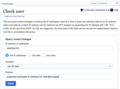
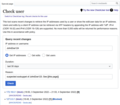
  1. Special:CheckUserを開きます。
  2. user の枠に、利用者名、(「利用者:」は省く)、IPアドレス、あるいはCIDRレンジを入力します。
    • IP: IPv4 もしくは IPv6 アドレス。
    • CIDR: CIDR prefixを付け加えることでIPレンジをチェックすることができます ( IPv4は /16 まで。IPv6は /64 まで、もしくは 65,536 アドレス). 表記法についてはレンジ・ブロックを見てください。
    • XFF: X-Forwarded-For headers by appending /xff (for example, 127.0.0.1/xff)でIPをチェックすることも可能です。
  3. 取得したい情報を選んでください。
    • Get IPs: は登録利用者の使用したIPアドレスを返します。
    • Get edits from IP: そのIPアドレスまたはレンジから利用者(登録または匿名)が行ったすべての編集を返します。
    • Get users: そのIPアドレスまたはレンジから編集したすべての利用者を返します。
  4. 理由欄には、あなたが秘密情報を取得する理由を入力してください。状況を簡潔に要約するよう努めてください(たとえば、「クロス・ウィキ・スパム」など); これはログページに表示され、場合によってはオンブズマンによる調査の対象となります。
  1. Go to Special:CheckUser.
  2. In the user field, type in the username (without the 'user:' prefix), IP address, or CIDR range.
    • IP: any IPv4 or IPv6 address.
    • CIDR: you can check a range of IP addresses by appending the CIDR prefix (up to /16 for IPv4 or /64 for IPv6, or 65,536 addresses). For notation, see Range blocks.
    • XFF: you can check an IP address provided by X-Forwarded-For headers by appending /xff (for example, 127.0.0.1/xff).
  3. Select the information you want to retrieve.
    • Get IPs: returns IP addresses used by a registered user.
    • Get edits from IP: returns all edits made by a user (registered or anonymous) from an IP address or range.
    • Get users: returns user accounts that have edited from an IP or range.
  4. In the reason field, type in the reason you are accessing the confidential data. Try to succinctly summarise the situation (for example, "cross-wiki spam"); this will be logged and may be needed by the Ombudsman commission.

[edit] 返される情報/Information returned

利用者CU結果 ("get users")の典型例:

A typical entry in the checkuser results for a user summary ("get users") is as follows:
  • Example (Talk | contribs) (20:11, 24 December 2009 -- 20:12, 24 December 2009) [5]
    1. 127.0.0.37 XFF: 127.0.0.1, 127.0.0.5
      Mozilla/5.0 (Windows; U; Windows NT 5.1; en-US; rv:1.8.0.11) Gecko/20070312 Firefox/1.5.0.11

データは豊富な情報を簡単にリストしたりかき混ぜたり出来るようなフォーマットになっていますが、提供される情報が何か分からないと、情報を読み取ることは難しいでしょう。情報は以下のように表示されます:

his is formatted to fit a lot of information into a format that can very easily be listed and skimmed, but is difficult to read unless you know what the information provided is. The information is laid out as follows:
  • username (user links) (time period when they edited from the given IP or range) [number of edits from the IP or range]
    1. IP address edited from XFF: XFF information provided (can be spoofed)

編集時のIP/XFF組み合わせが使用した順に表示されます。

Each IP/XFF combination used to edit is listed, in order of use.

それぞれのIPもしくはレンジからなされた編集につき、直近10UAが利用者ごとに表示されます。

The last ten user agents for each user for edits made in the IP or range are listed afterwards.

[edit] インストール/Installation

インストールについては mw:Extension:CheckUserを見てください。

[edit] 関連項目

メディアウィキ・ユーザーズガイド - ヘルプ・ページ全部

一般的な利用法: 表示 | 検索 | 検索に使用できない単語 | URL | 名前空間 | ページ名 | セクション | リンク | リンク元 | パイプ付きリンク | 言語間リンク | リダイレクト | 変数 | カテゴリ | 画像ページ | 特別ページ
ログイン及びユーザー設定: ログイン | オプション | 外装の詳細設定
起稿・編集: ページの編集 | 新規ページの作成 | 画像/ファイル | 特殊文字 | 数式の書き方 | 表の作り方 | EasyTimeline | テンプレート | リダイレクト | ページの移動 | Editing shortcuts | Talk page | Testing || rlc
改定追跡: 最近更新したページ | 拡張された最近更新したページ | リンク先の更新状況 | ウォッチリスト | 差分 | 履歴 | 要約欄 | ユーザの投稿記録 | 細部の編集 | 編集のパトロール

他プロジェクト: Wikibooks | Wikicommons | Wikinews | Wikipedia | Wikiquote | Wikisource | Wiktionary - Edit this template