

WMDE Technical Wishes/Sub-referencing/pt-br
| Sub-referência | |
|---|---|
| Status | Em andamento |
| Origin | Pesquisa de Aspirações Técnicas 2013, 2015, 2022 e outros |
| Focus area | Faça a reutilização de referências mais fácil |
| Phabricator | conselho de projeto |
| Responsible | Equipe de Aspirações Técnicas |
 Diga-nos o que você acha Nós convidamos você para testar nosso protótipo, o qual nós atualizamos continuamente. Apoie essa página ou inscreva-se nessa lista de mensagem para descobrir sobre novas coisas que você pode testar | |
Atualmente, não é possível reutilizar a mesma referência com detalhes diferentes de forma fácil em um artigo. Membros da comunidade têm solicitado repetidamente para a MediaWiki, soluções que funcionem sem modelos e sejam baseadas no modo que as referências existentes já funcionam, tanto para o wikitext quanto para o Visual Editor. » Entenda mais sobre o problema
As part of the focus area "Make re-using references easier", Wikimedia Deutschland’s Technical Wishes team is introducing sub-referencing – an optional feature that allows you to easily attach different details to an existing reference, without having to duplicate it.
Nosso plano é trazer sub-referências para as wikis da Wikimedia no final de 2024.
Sub-referências em poucas palavras
Para citar uma fonte mais de uma vez com detalhes diferentes, você precisa de uma referência principal e uma subreferência.
- A referência principal contém as principais informações bibliográficas.
- A sub-referência contém os detalhes: qualquer tipo de informação adicional que seja diferente para cada uso, por exemplo o número da página, capítulo, versículo ou citação.

- Na seção de referência, leitores veem todas as sub-referências agrupadas abaixo de sua referência principal. Isso torna mais fácil entender com que frequência uma única fonte foi citada naquele artigo.
- No wikitexto, você deve adicionar um atributo na sub-referência. O nome atual é extends, mas pode ser mudado antes que o recurso seja implantado. Coletaremos mais opiniões sobre o nome do atributo.
- No Editor Visual, estamos alterando a caixa de citação existente para que ela suporte sub-referências.
Principais benefícios
- A sub-referência é baseada na maneira como as referências funcionam atualmente.
- It works for both Visual Editor and wikitext – bringing us closer to feature parity between Visual Editor and wikitext.
- A mudança será integrada ao MediaWiki, ficando disponível em todos as wikis da Wikimedia e podendo ser utilizada sem alterações nas predefinições.
- Sub-references will be properly displayed in Reference Previews and mobile reference pop-ups.
- É opcional: Você ainda pode usar outros métodos para referenciar. Mas poderá encontrar sub-referências em artigos escritos por outros usuários.
- Teste o protótipo! Leia mais sobre como testar.
- Dê sua opinião na página de discussão.
- Vigie esta página ou inscreva-se para receber mensagens para descobrir coisas novas que você pode testar.
Como funciona
No wikitexto
A adição de sub-referências no wikitexto está quase pronta. No entanto, o nome do atributo pode mudar. A mudança ainda não foi implantada principalmente porque queremos evitar que os usuários do Editor Visual tenham uma experiência diferente. O suporte ao Editor Visual ainda está em desenvolvimento.
Você ainda pode testar o protótipo e nos contar como ele está funcionando para você.
Benefícios específicos do wikitexto
- A implantação é baseada no conceito existente e conhecido de nomear a referência.
- Não requer nenhum conhecimento de predefinições.
- Referências quase duplicadas podem ser removidas do wikitexto, tornando-o mais limpo, menos redundante e mais fácil de ler.
Passo a passo
1) Você precisa de uma referência com as principais informações bibliográficas, a referência principal. Esta referência precisa de um nome:
<ref name="Miller">E. Miller, ''The Sun''. New York: Academic Press, 2005.</ref>
This main reference should be placed in the references section, or else you will have a reference in the article that does not show any details like page numbers. In the references section, use the syntax <references> … </references>. If the article is already using <references />, remove it.
2) You create a sub-reference, using the name of the main reference with the attribute extends. You add the details between the <ref> tags:
<ref extends="Miller">Page 23.</ref>
É assim que se parece:
According to scientists, the Sun is pretty big.<ref extends="Miller">Page 23.</ref> In fact, it is very big. Take their word for it.<ref extends="Miller">Page 48.</ref> Don't look directly at the sun!<ref extends="Miller">Page 23.</ref>

==References==
<references>
<ref name="Miller">E. Miller, ''The Sun''. New York: Academic Press, 2005.</ref>
</references>
|
|


If you want to reference a new source using sub-references in wikitext, you only need to make sure to create the main reference in the references section.
But in many cases, you probably want to use sub-referencing with a reference that already exists in the article. In these cases
- Turn the original reference into a main reference by using
<ref name>. - Move the main reference into the references section.
- Create a sub-reference where the original reference previously was in the article text.
- Move the details of the main reference (page numbers etc.) into the sub-reference. Make sure they no longer remain in the main reference, otherwise those details will be shown twice.
- Create more sub-references wherever you want to cite the source with different details in the article.
You can also re-use a sub-reference itself by giving the sub-reference a name:
According to scientists, the Sun is pretty big.<ref extends="Miller" name="Miller, 23">Page 23.</ref> In fact, it is very big. Take their word for it.<ref extends="Miller">Page 48.</ref> Don't look directly at the sun!<ref name="Miller, 23" />

==References==
<references>
<ref name="Miller">E. Miller, ''The Sun''. New York: Academic Press, 2005.</ref>
</references>
|
|
Please note
- Converting references to main and sub-references requires some clean-up; and the main reference typically needs to be in the references section (as described above).
- You can use sub-referencing with citation templates. We’ve tested the most commonly used ones, but your favorite template might need some updates in order to work with our solution.
- Some gadgets/scripts related to references might also need an update in order to properly work with the new sub-referencing solution.
- It is not possible to make a sub-reference of a sub-reference.
- If
<ref group>is used, the main reference and the sub-reference need to be in the same group.
In Visual Editor (in development)
At this point, we don’t know exactly what the feature for Visual Editor will look like. So far, we have a very minimal solution that is not yet ready to be deployed. In the upcoming weeks, this solution will most likely change.
You can also test the prototype with the current state of the Visual Editor solution. Please keep in mind that it will likely change. We will update this page when new aspects can be tested.
Benefits specific to Visual Editor
- To cite the same source with different details, you no longer have to create a new reference from scratch.
- Sub-references are fully compatible with Visual Editor (as opposed to template-based workarounds): You can create them via the citation dialog and you can edit them from within the references section.
Workflows in the current prototype (likely to change)
Creating a sub-reference
- Creating a sub-reference currently works via the the existing citation dialog.
- In the "re-use" tab, select the reference you want to re-use via the three dots and click "re-use this reference with additional details".

- Enter the details of that sub-reference and click insert.

- The reference popup in Visual Editor shows you that this reference is a sub-reference, and how often it is re-used.


Editing an existing sub-reference
- Click on the footnote marker in the article text to edit a sub-reference.
- You can now change the details of the sub-reference. You are also informed that it is a sub-reference.

- You cannot edit a sub-reference from the reference list yet.
- To edit the main reference, click on it in the references section.

Re-using a sub-reference
- You can re-use a sub-reference using the "re-use" tab in the citation dialog.


Please note
- The existing problem with auto-names for references in Visual Editor also occurs with sub-referencing.
- In Visual Editor, it is currently possible to make a sub-reference of a sub-reference. This is an error and causes an error upon saving. It is not supposed to work later in the actual solution, and does not work in wikitext, either.
- We have yet to work on what happens when you delete a reference that is being re-used.
- The workflow on turning an existing reference in a main and sub-reference has yet to be defined.
- When you create a re-use of a sub-reference in Visual Editor and then switch to wikitext, you will find that the statement in wikitext is
<ref extends="main-reference" name="sub-reference" />. This is a bug and will be fixed as part of T367749. <ref name="sub-reference name"/>currently does not show the Reference Preview for the sub-reference properly in Visual Editor editing mode. You will only see the sub-reference's details in the pop-up and not the information from the main reference. To see the main reference's information in the pop-up as well, you should currently use the syntax<ref extends="main" name="sub-reference name" />.
 Test the prototype
We need your feedback to make sure we build the right things. Feedback or questions are always welcome on this project’s talk page.
The prototype is available on beta wiki. Currently, we primarily invite you to test the wikitext solution:
- They might look different (e.g. not use your preferred skin).
- They might offer some new features that are still being tested.
- They only contain some test pages and templates, not your entire wiki’s content, and not all the templates, modules, gadgets etc. you are used to.
- Your regular Wikimedia login doesn’t work on beta wikis. You can either register an account – make sure to use a different password than your regular Wikimedia account – or test the feature without an account, which will lead to the creation of a temporary account (on de-betawiki) – or display your IP address (on en-betawiki).
The problem we are solving
In Wikipedia articles, it is common to reference a source multiple times. But while you can re-use a reference exactly as it is, you currently cannot re-use the same reference with different details (e.g. different page numbers). Your only option is to create a whole new reference or to use workarounds.
Status quo: Re-using references in wikitext and Visual Editor
If you want to re-use a reference in wikitext, you can turn it into a named reference and refer to that name at another point in the article. The named reference can be placed in the article text or in the references section. In Visual Editor you can use the option "re-use" in the citation dialog. In the references section, references with the same name are grouped together.
-
 Wikitext: <ref name> in the article text
 -
 Wikitext: <ref name> in the references section
 -
 Editor Visual: diálogo de citação
 -
 Visão do leitor


Status quo: Re-using references with different details in wikitext
If you want to re-use an existing reference with different details in wikitext, you currently need to copy and paste the existing reference and change the details of the duplicate or create a new (almost identical) reference from scratch. Some projects use workarounds like short citations or template-based solutions like shortened footnotes. In the references section, the original reference and the new one you created are not grouped together.
-
 Two almost identical references in the wikitext.
 -
 Reader's view: Almost identical references are not grouped together
 -
 Workaround with short citations in wikitext
 -
 Reader's view: workaround with short citations
 -
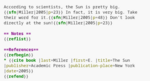 Workaround with {{sfn}} in wikitext
 -
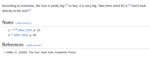 Reader's view: workaround with {{sfn}}


Status quo: Re-using references with different details in Visual Editor
If you want to re-use an existing reference with different details in Visual Editor, neither the option "re-use" in the citation dialog nor the copy-and-paste method will work, because both lead to identical re-uses, and changing details of the re-used/copied reference changes both instances of that reference. Instead you’ll need to create a new (almost identical) reference from scratch. In the references section, the original reference and the new one you created are not grouped together.
References created by template-based workarounds like {{sfn}} cannot be edited from within the references section and don’t appear in the citation re-use tab; but it is possible to edit them manually when locating them in the article text.
workaround with {{sfn}}:
-
 Reader's view
 -
 The references disappear from the references section when clicking "edit".
 -
 It is not possible to use {{sfn}} references via the "re-use"-dialog.
 -
 References can only be edited when locating the reference in the article text


Problems for readers
Template-based workarounds are not properly displayed in Reference Previews, Reference Tooltips and mobile reference pop-ups.
{{sfn}} workaround with previews for references:
-
 Reference Previews: The main information is not included in the pop-up.
 -
 Reference Tooltips: The main information is not included in the initial pop-up.
 -
 Reference Tooltips: The main information is shown in another pop-up.
 -
 mobile reference pop-ups: The main information is not included.


Main problems with the status quo
- The experience of Visual Editor and wikitext users is very different.
- Most workarounds for reusing references with different details don’t work properly in Visual Editor.
- Creating lots of almost identical references with different details makes the wikitext longer and potentially harder to read.
- Template-based workarounds are not equally accepted by all communities and thus not globally available.
- Some users try to avoid this issue by putting sources in the bibliography section without using them as references at all, which makes it harder to verify sections of the article.
Mudanças recentes e próximos passos
Our team has worked on this problem on and off for some time now. Here is an overview of this project’s history, including our research.
Thank you to everyone who participated in tests and interviews and who showed interest, as well as everyone who took the time to comment on our talk pages over the years. It is deeply appreciated. If you have further feedback, please share it on the talk page.
 A prototype is available on beta wiki. It covers the wikitext solution and some of the basic features of the Visual Editor solution. You can continuously test the prototype and give feedback.
- We have sent out announcements across all wikis to let communities know about this upcoming feature, and have invited them to test and give feedback.
- Our team presented sub-referencing at Wikimania 2024 and discussed with participants. (YouTube)
- Moderated users tests took place across different projects in 2024.
- As of October/November 2024, we are currently exploring possible changes to our wikitext approach, based on the community feedback we've received. We'll reach out to communities soon to get more feedback on possible changes to the sub-referencing feature.
- Pilot wiki deployment is stalled, pending discussions and potential changes to our feature.
- We are planning to deploy the sub-referencing feature to other Wikimedia wikis in 2025.
- We will continue to collect feedback to improve the solution after deployment.

We are aware of other problems in the focus area "reusing references", and we will try to address them along the way. Our focus, however, remains on creating a solution for sub-referencing.
Frequently Asked Questions
Como posso encontrar artigos que usam sub-referências?
Uma categoria de rastreamento chamada Categoria:Páginas que usam referências estendidas é adicionada a qualquer página onde sub-referências são usadas, permitindo que você explore ou corrija artigos usando o novo recurso. O nome desta categoria pode mudar.
Posso usar esse recurso com predefinições/ferramentas de citação?
Sim, você pode usar sub-referências com predefinições de citação. Testamos os mais comuns (por exemplo, citar livro e citar web) e não esperamos problemas. Mas sua predefinição favorita pode precisar de algumas atualizações para funcionar com nosso recurso. Alguns gadgets/scripts relacionados a referências também podem precisar de uma atualização para funcionar corretamente com as sub-referências. Como as predefinições, gadgets e scripts estão nas mãos das comunidades e não podemos adaptá-los.
Please let us know, on the talk page, if you discover any problems or need some help updating citation templates to make them work with the new feature.
Qual será o nome do atributo na sub-referência?
Ainda não sabemos. Atualmente, o nome do atributo para usar sub-referências no wikitext é extends. Decidimos por esse nome alguns anos atrás, após discutir com comunidades e partes interessadas da Fundação Wikimedia. No entanto, recebemos alguns comentários de que esse nome pode não ser a melhor opção. Antes de implementarmos esse recurso nas wikis, queremos obter mais opiniões sobre o nome e estamos planejando colocar algumas alternativas para discussão. Avisaremos quando isso acontecer.
Por que essa opção foi escolhida para o wikitexto?
Quando começamos a trabalhar na implementação desse recurso no wikitexto, discutimos diferentes opções. Adicionar uma nova tag (por exemplo, <subref>) foi discutido cuidadosamente, mas queríamos manter a abordagem <ref> existente, para minimizar a quantidade de nova sintaxe que os usuários têm que aprender. Além disso, introduzir uma nova tag exigiria muitas atualizações no software existente (incluindo scripts, gadgets, bots etc.).
One proposal (from 2008) was to specify the subreference’s details within the <ref> tag: <ref page="page 2" name="Miller"> or later <ref detail="page 2" name="Miller"> using the name attribute to refer to the main reference. This is similar to what users know from working with templates like {{cite book}}.
The main issue with this approach is, however, that it causes problems with templates and is very likely to cause errors. Another problem with this syntax is that it does not allow to re-use a sub-reference, because the name attribute has already been used to refer to the main reference and cannot be used a second time.
A way to avoid both these issues is to create a new reference attribute and put the sub-reference’s details in the area between the opening and closing <ref> tags, the same way it is already done for the content of references. This is what our approach does.
Por que demorou tanto para encontrar uma solução?
A equipe de Desejos Técnicos trabalhou nesse recurso de vez em quando por muitos anos. Se você quiser saber mais, aqui está uma visão geral do histórico e da complexidade desse problema.